Prime Entity · Plug-ins

FilterFOLVK

Two filters. Every shape between.

Fifty-eight filter types across two stereo filters — chained, parallel or split — with a full modulation section and a finishing stage of saturation and twenty effects. Works as an effect on any channel, or a synth played from MIDI.

Or try it free first
  • VST3 · AU · Standalone
  • macOS, Apple Silicon and Intel
  • Effect & Synth — one licence
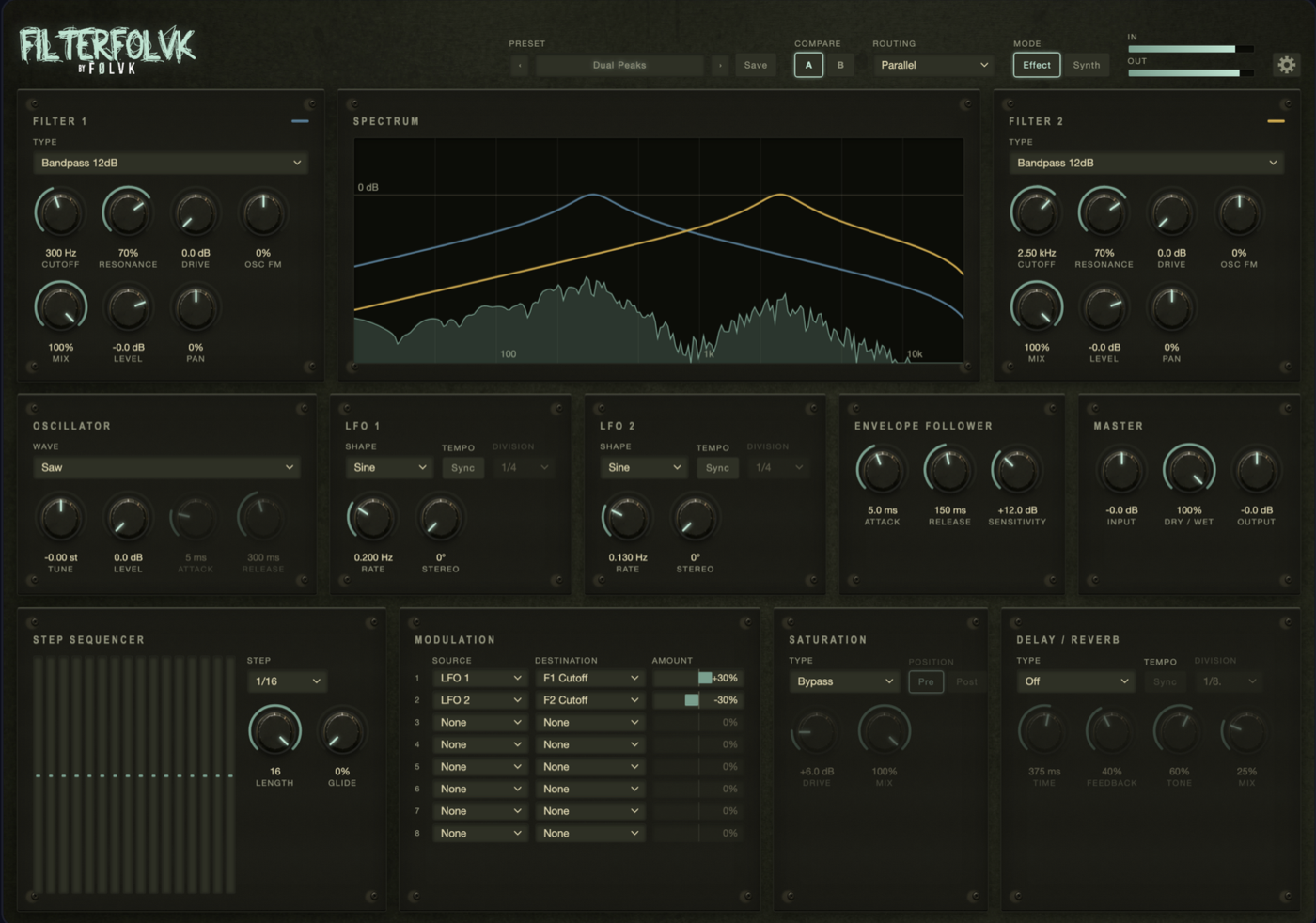
FilterFOLVK 0.1.1 The FilterFOLVK interface — two stereo filters with live spectrum display, modulation matrix, saturation and effects
Why it exists

Most filter plug-ins give you one filter
and a handful of slopes.

The interesting sounds live in between: a ladder pushed into overload, a vowel that moves, a comb tuned to a note, two band-passes pulling against each other.

The usual approach

Multiple plug-ins just to shape a filter sound.

  1. Insert a filter plug-in for the first filter
  2. Add a second filter plug-in for a parallel or chained sound
  3. Add an LFO to move the first cutoff
  4. Add a separate envelope follower
  5. Add saturation after the filters
  6. Add a delay or reverb at the end
  7. Wire the modulation between separate plug-ins by hand

Then route, balance, and start over for every new sound

With FilterFOLVK

One insert. Both filters. All the movement.

  1. Drop FilterFOLVK on the channel, pick two filter types, and route an LFO to the cutoff.

Both filters, the modulation section, the saturation and the effects all sit in one plug-in with one picture of what is happening. The display shows both filter curves over the live spectrum so you see exactly what one is doing to the other.

Two filters. One place. Everything connected.

What's inside

Fifty-eight types.
Four routings.
One picture.

Both filters run in stereo and share a live spectrum display. Route them in series, in parallel, or split across left and right — then move them with everything the modulation section has.

01

Fifty-eight filter types

Twelve families: lowpass and highpass in six slopes each, bandpass, notch and allpass, analogue ladders that self-oscillate and overload, resonators and vowel formants, phasers, combs, EQ shapes, FM and ring modulation, and lo-fi resamplers. Every type is available to both filters at the same time.

02

Four routings

Serial 1 > 2 and Serial 2 > 1 run one filter into the other — a highpass into a lowpass becomes a band you shape from both sides, a ladder into a formant becomes a voice with a body. Parallel feeds both from the input and adds them. Split L/R gives each filter its own side.

03

Full modulation section

An oscillator with fifteen shapes, two tempo-synced LFOs with eight shapes, a sixteen-step sequencer and an envelope follower all feed one eight-slot modulation matrix. Anything that moves can move almost anything else — cutoff, resonance, drive, level, pan and more — across both filters at once.

04

Live spectrum display

The output spectrum fills the display in real time. Both filter response curves are drawn over it — blue for filter 1, yellow for filter 2 — before modulation. You see where each filter sits; the spectrum shows what it is actually doing to the signal right now.

05

Saturation and effects

Twelve saturation types — Soft Clip, Hard Clip, Tube, Presence, Wave Wrap, Wave Shape, Bit Crush and more — placeable before or after the filters. Twenty effects in three families follow: eight delay types, four modulation effects, and seven reverbs from Ambience to Cathedral.

06

Effect and Synth in one

Switch between Effect mode, where the filters process your incoming audio, and Synth mode, where the internal oscillator replaces it — played from MIDI on an instrument track. One licence covers both the effect and the synth version. Forty-two factory presets across five groups get you started straight away.

Before you buy

Hear it on
your own sound.

The download is the full plug-in. Without a licence it runs in demo mode: every twenty seconds the audio briefly mutes for five seconds, then fades back in. Every filter, every parameter, every preset available to try before you decide.

VST3, AU and Standalone. macOS 11 or later, Apple Silicon and Intel. Includes FilterFOLVK (effect) and FilterFOLVK Synth (instrument).

Download the demo
Turning the demo into the full version

One sign-in. Done.

  1. Buy FilterFOLVK below
  2. Check your email for the password link
  3. Open FilterFOLVK and sign in
  4. The licence is stored locally — no internet required after that
Get FilterFOLVK

One licence.
Offline forever.

Sign in once inside the plug-in, and it stores a signed licence locally. No internet required after that. One computer at a time — move it yourself from your account whenever you need to.

After purchase you receive an email with a link to set a password. From there, sign in inside FilterFOLVK on macOS. The licence is stored on that machine and survives reinstalls and OS updates.

Questions? Mail info@prime-entity.nl

FilterFOLVK

Two filters. Every shape between.

€89,- €49,- one-off · excl. VAT

Introductory price. VAT is added at checkout where it applies.

  • VST3, AU and standalone build
  • macOS 11+, Apple Silicon and Intel
  • FilterFOLVK (effect) + FilterFOLVK Synth (instrument)
  • 58 filter types across 12 families
  • 4 routings — serial, parallel, split L/R
  • Oscillator, 2 LFOs, envelope follower, 16-step sequencer
  • 8-slot modulation matrix
  • 12 saturation types, 20 delays and reverbs
  • 42 factory presets in 5 groups
  • A/B comparison
Questions

About FilterFOLVK

How does activation work?

After purchase you receive an email with a link to choose a password. Open FilterFOLVK in your DAW or as a standalone, sign in with your email and password, and the plug-in stores a signed licence locally. No internet required after that. You can move the licence to another machine from your account at prime-entity.nl/account.

Does one licence cover both the effect and the synth?

Yes. FilterFOLVK and FilterFOLVK Synth are one product. Activating either one unlocks both on the same computer. To move to another machine, release the current computer from the gear menu in the top bar or from your account, then sign in on the new one.

Is there a demo?

Yes. Download the demo here — it's the full plug-in. Without a licence it mutes briefly every twenty seconds. Every filter, every parameter and every preset is available to try. Purchase unlocks it permanently.

What filter types are included?

Fifty-eight across twelve families: lowpass and highpass in six slopes each (6 to 48 dB/oct), bandpass, notch and allpass, analogue Moog and Diode ladders, resonators, vowel formants (A, E, I, O, U and Vocal Morph), phasers and combs, EQ shapes (peak, shelf, tilt), FM and ring modulation, and lo-fi resamplers.

Does it work on Windows?

FilterFOLVK launches on macOS (11 or later, Apple Silicon and Intel). A Windows version is not planned for the initial release.

Will a ReFOLVK, FOLVKano, FOLVKlip or Distking licence cover FilterFOLVK?

No. FilterFOLVK is a separate product with its own licence. Your existing purchases stay exactly as they are.

Also from Prime Entity

The plug-in family

ReFOLVK, FOLVKano, FOLVKlip and Distking are available now. Same activation model, same offline licence, same family.

View ReFOLVK View FOLVKano View FOLVKlip View Distking
Sander and Erik at work in the studio
The makers

We make plugins because we love music. The emotion, the energy, and the endless process of shaping an idea into something that truly feels alive. As producers ourselves, we know that the best tools don’t interrupt creativity. They support it.

That’s why every FØLVK plugin is built with passion, care and real craftsmanship. We focus on what truly matters: great sound, an inspiring workflow and controls that simply make sense. No unnecessary complexity. No endless menus. Just powerful, reliable tools designed to make the lives of fellow producers easier and more effective.

Simple by nature. Serious in sound. Made for music.

Sander & Erik